Attendance on the phone
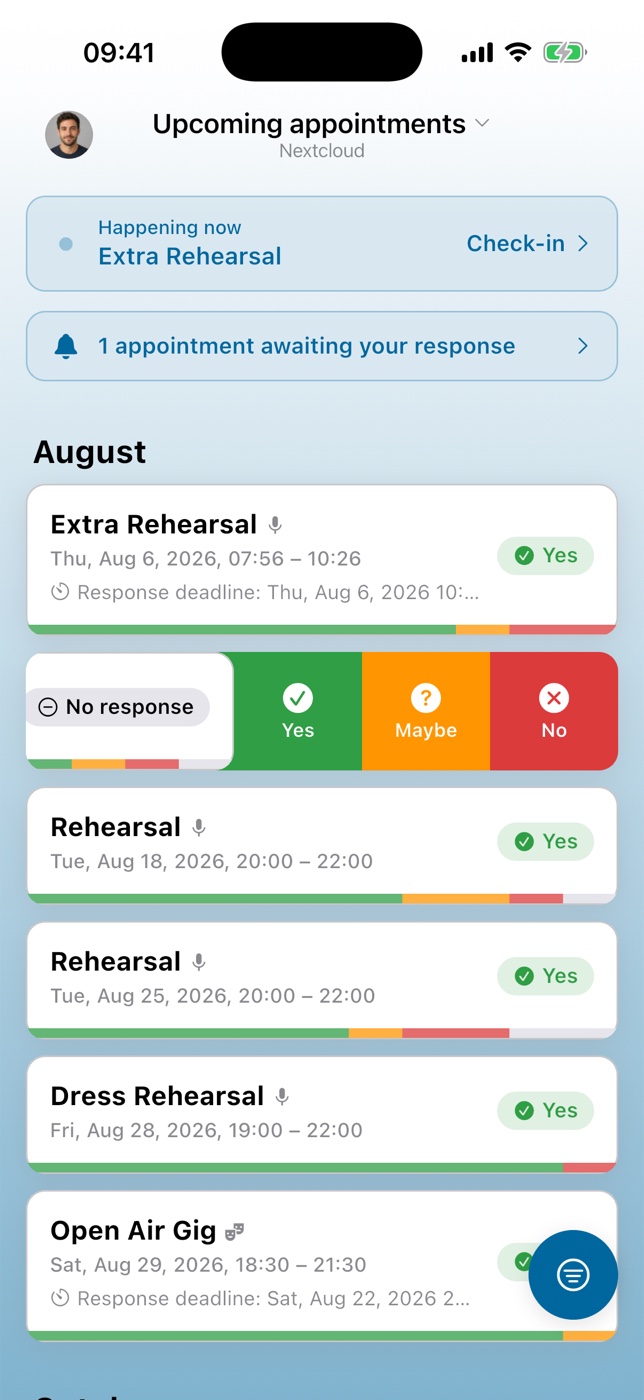
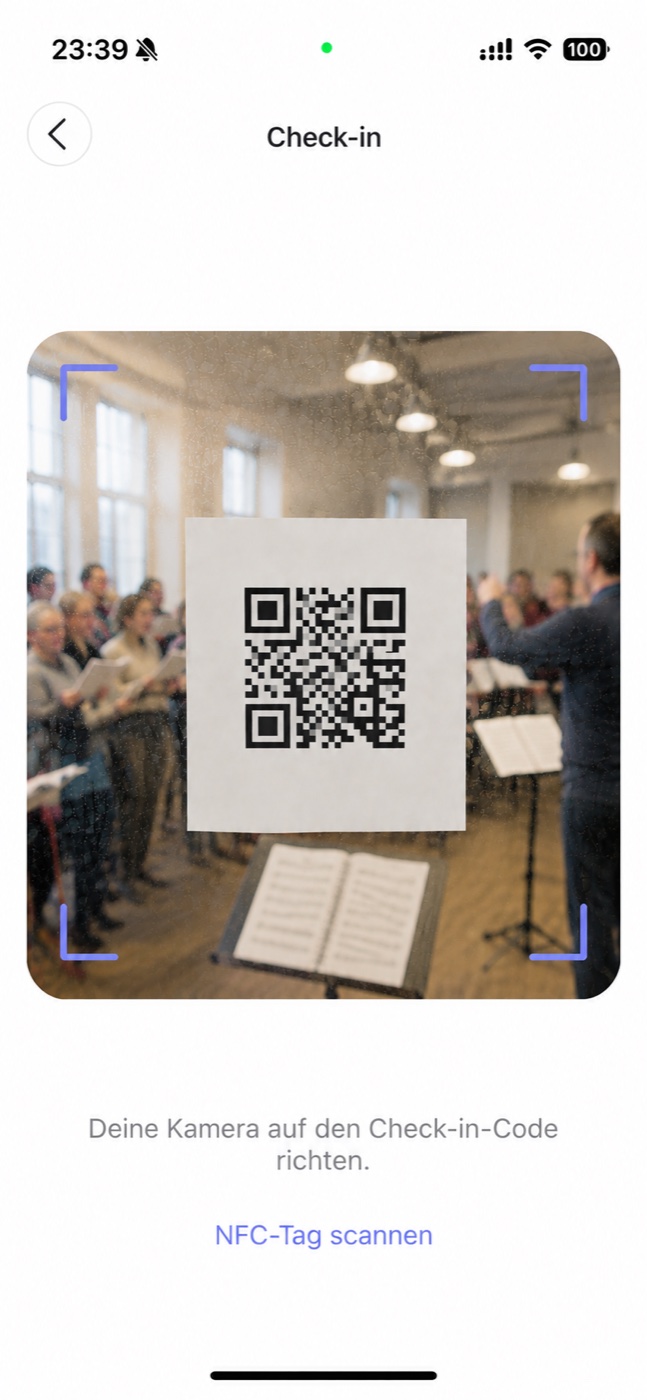
The app for iOS and Android connects to your own Nextcloud: see your appointments, answer them, get told when something changes. And the best part: attendees check themselves in, by QR code or NFC tag.
Free for 30 days, no payment details
After that, a yearly subscription: a personal license for yourself or one license for your whole group. The Nextcloud app stays free and open source.
Also available on F-Droid, with push through UnifiedPush – no Google services needed.
What the app does
Everything you already know from the Nextcloud app – plus the two things that only work on a phone.
Self-check-in
One scan or one tap, and the person is checked in. Nobody stands at the entrance with a list, ticking off names.
Push notifications
New appointments, reminders and responses arrive right away – no need to open Nextcloud in a browser first. On Android without Google, delivery runs through UnifiedPush.
Respond on the go
Yes, No or Maybe (if the appointment offers it) with an optional comment, straight from the phone. Withdraw a response just as easily.
Your appointments at a glance
Upcoming and past appointments, unanswered ones first, with all the details, attachments and comments. Filter by role, create all-day appointments, and start a new appointment from a category template.
Several accounts
Connect more than one Nextcloud account in the same app – handy if you are active in several groups.
Attendance limit and waitlist
When an appointment is full, you can join the waitlist: the card shows “On the waitlist” and your place in the queue, and you move up when a spot frees. Organizers set the limit in the app, too.
Vacation
Record your vacation periods in the app. The app tells you who is away when you create an appointment, and with the right permission you can look at the team's vacation as well.
No Google needed
Install the app from F-Droid and receive push notifications through UnifiedPush instead of Google. You need a UnifiedPush distributor app on the phone, such as ntfy.
Your server stays your server
The app talks to your own Nextcloud. There is no account with us and no copy of your data on our side.
How self-check-in works
One code for the whole instance. The app matches the scan to the appointment that is currently running.
Set it up once
In the Nextcloud admin settings you will find the instance QR code to download and print, plus the URL to write onto an NFC tag.
Put it up at the entrance
Hang the printed code by the door or stick the NFC tag next to it. The same code works for every appointment.
Everyone checks in
Members scan or tap on arrival. The check-in window opens 30 minutes before the start by default and always closes when the appointment ends.
Login and privacy
The app is a client for your server, not a service you sign up to.
You never hand us a password
Login runs through Nextcloud Login Flow v2. Your server issues an app-specific password to the app; your actual Nextcloud password never passes through us.
We cannot read your notifications
Push messages are encrypted by your Nextcloud server and can only be decrypted on your device. Our relay forwards the sealed payload without being able to open it.
No account with us
There is nothing to register. Your appointments, responses and member data stay where they already are: on your own Nextcloud.
Read the details
The full privacy policy and terms of use for the app and the push service are published in full.
What it costs, and why
The Nextcloud app is free and open source, and it stays that way. The mobile app is not, and here is the honest reason: a push server has to run somewhere, and the developer accounts at Apple and Google cost money every year whether anyone downloads the app or not.
After the trial it is a yearly subscription: a personal license for yourself, or save with one license for your whole group.
Personal
€11.99/year
That is €0.99 a month
Just for you. The license follows your App Store or Google account, so it works on every Nextcloud account you sign in with.
Basic
€29.99/year
Up to 30 members
For a small group. One license covers everyone on your server – from 3 people on it already costs less than personal licenses.
Standard
€59.99/year
Up to 100 members
The right fit for most choirs, clubs and teams. One license covers everyone on your server.
Premium
€149.99/year
Unlimited members
For large organizations, with priority email support on top.
Try it for a month first. Which plan you go for is a decision for later – inside the app.
30 days free
Every Nextcloud instance gets a full month to try everything, with no restrictions and no payment details.
Every plan has every feature
The plans differ only in who they cover and how many members. Nothing is held back for a higher tier.
Billed yearly
Purchase and cancellation run through the App Store or Google Play. The prices shown in the app and the store are the ones that apply – they may differ by country. The F-Droid version has no in-app purchase: you book directly by email and get an invoice.
Already donated?
If you have supported the project with a donation, write to me and I will unlock the app for you at no charge – for several months or a full year, depending on the amount. Details on the support page.
What you need
- A Nextcloud server, version 32 or later
- The Attendance app installed on that server
- Your own account on that Nextcloud
- An iPhone or Android device – for NFC check-in, one with an NFC reader. Without Google services, install from F-Droid and add a UnifiedPush distributor app such as ntfy
Not running Attendance yet? The documentation walks through the setup.
Try it for a month
Install the app, log in to your Nextcloud, print the QR code. If it does not earn its keep within 30 days, you have lost nothing.